Is there one list of everything a dispatcher needs to act on during the day?
Short answer
Yes. Afi Planner’s Needs attention list gathers what a dispatcher has to act on: failed deliveries, stops at risk of missing their window, routes not opened, drivers who haven’t started, phones that stopped sending GPS, missing proof and customers asking for another day. Each item comes with its next step, and the list is shared, so everyone sees who is on what.
How it works in Afi Planner
Exceptions, not a map to stare at
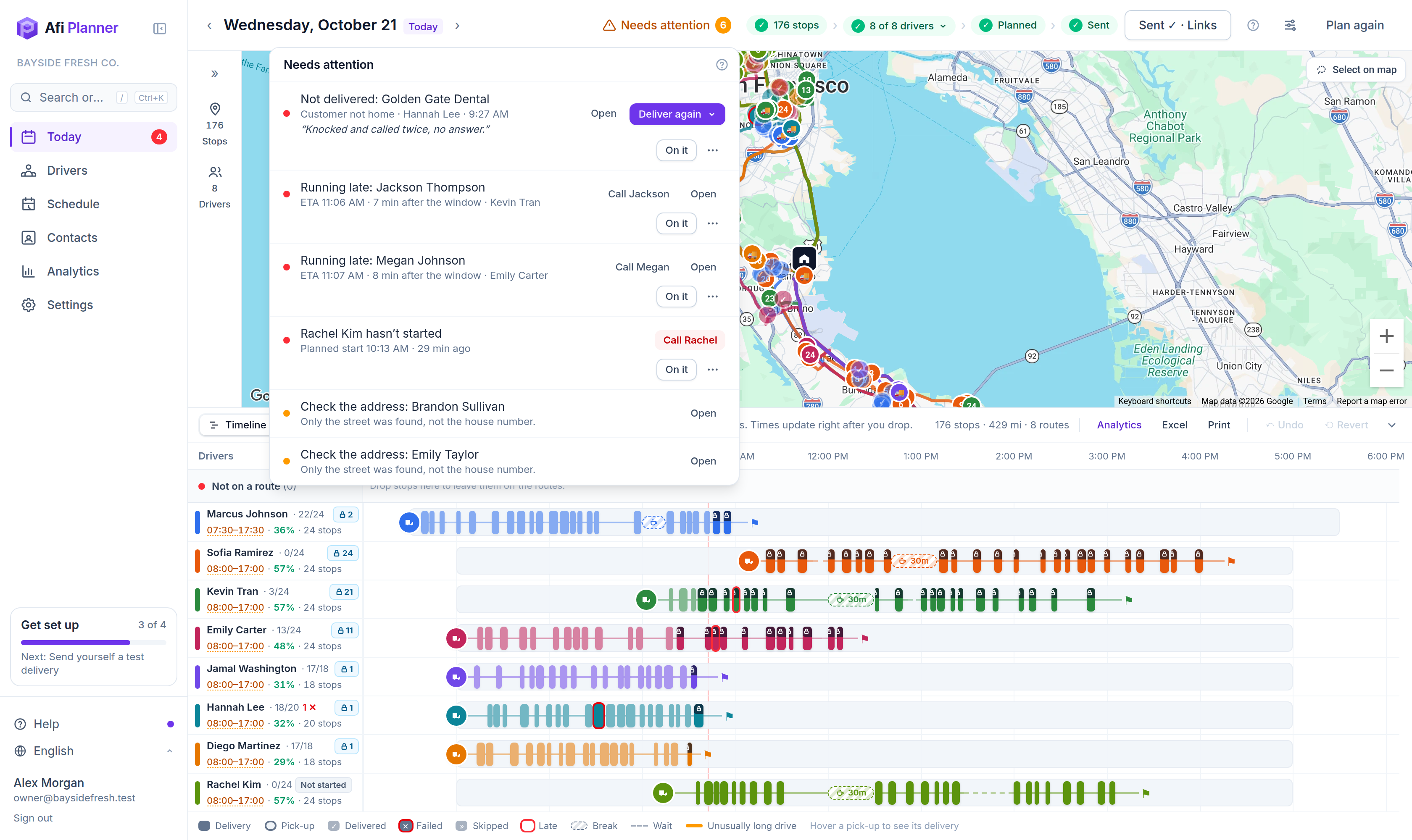
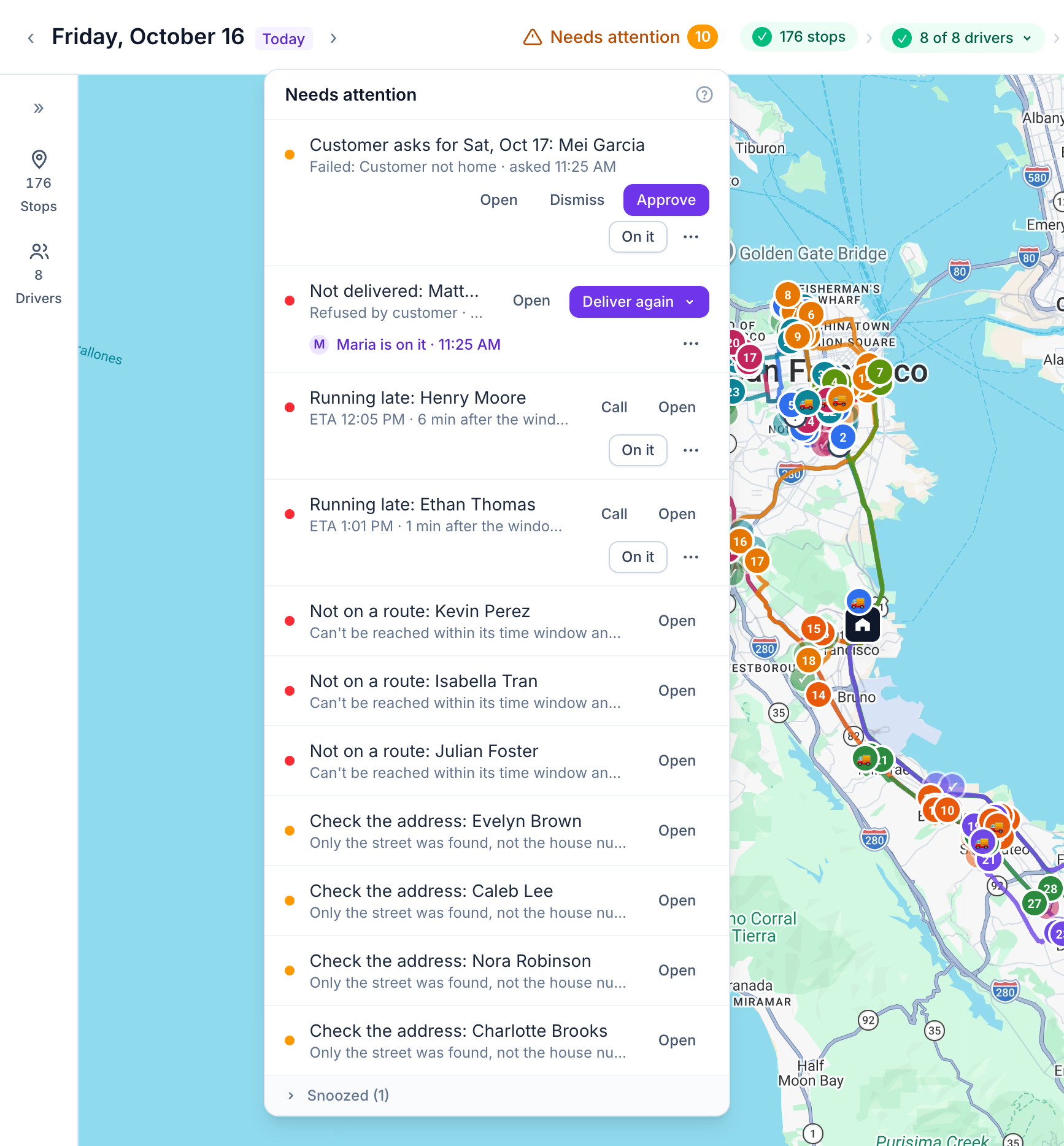
Instead of scanning the map all day, work down one list. Each item says what happened and offers the next step: deliver again, call the driver, copy the route link or approve the day a customer asked for.
- Failed deliveries with the driver’s reason and photo
- Stops at risk of missing their window, based on live ETAs
- Drivers whose app says they haven’t started 15 minutes after the planned start, with a Call button
- Routes not opened yet, phones that stopped sending GPS, missing proof and addresses to check
- Deliveries nobody got to by the end of a driver’s day, moved to another day in one go
Shared by the whole team
Click On it and your teammates see “Maria is on it”, so nobody calls the same driver twice. Snooze an item for later or resolve it with a note; both leave the open list for everyone. If two people act on the same item at once, the second one is told who got there first.
- Customers who asked for another day after a missed delivery, ready to approve
- Low ratings on their own Follow-ups tab, with the customer’s reasons
- An end-of-day email you can turn on in Settings → Notifications: the day’s numbers, what is still open and who is on it
Try it in the live demo
A fictional delivery company in the middle of its day. Read-only, no sign-up.
Open the live demo →Feature
Dispatch & live tracking
Send routes to drivers in one click, follow every van on a live map, and get warned before a delivery runs late. Live ETAs from driver GPS and a “Needs attention” inbox your whole team shares.
5 steps · 4 min read
Sending routes to drivers and following the day live
Frequently asked questions
Can two dispatchers work the same list?
Yes. When someone clicks On it, everyone sees who has the item, and snoozed or resolved items leave the open list for everyone.
How does Afi Planner know a stop will be late?
ETAs are recalculated from each driver’s GPS position, so a stop at risk shows while there is still time to act.
Does an off-duty driver show up as a problem?
No. The app shares location only while the driver works today’s route, and the board shows “Not started” or “Day ended” instead of a missing position.
More answers
- How do I add new orders after my drivers have already left?
- How can I see exactly what happened on a delivery day, minute by minute?
- Can my customers track their delivery with a live ETA and see proof of delivery?
- Does the driver app work without a signal?
- How do I import delivery orders from Excel or CSV without mixing up the dates?
- Does Afi Planner have an API with webhooks?
Plan tomorrow’s routes in the next 3 minutes
Start your free 3-month trial. No credit card, no setup call, no installation.