Connect your systems in both directions
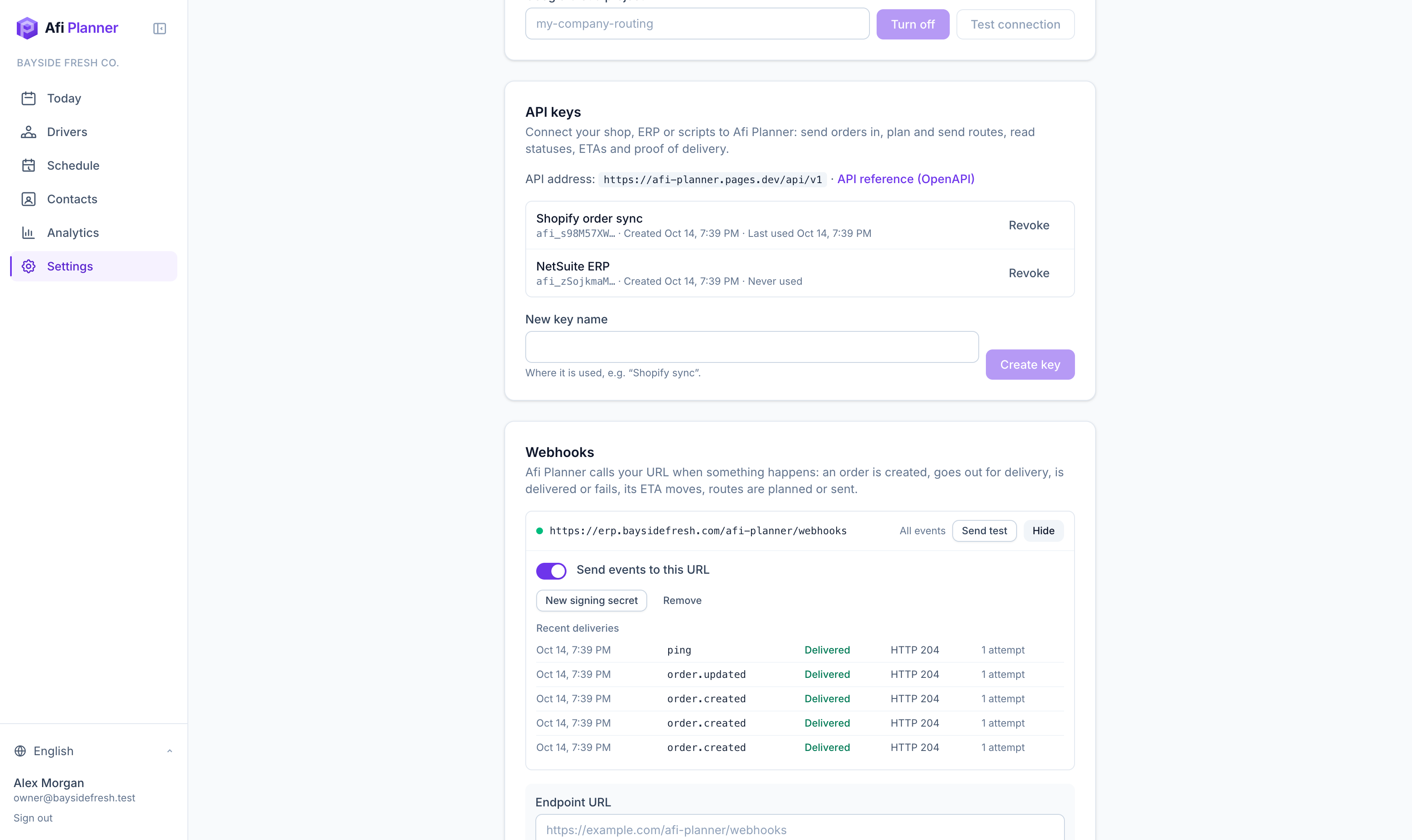
Orders flow in from your store or ERP, and everything that happens to them flows back: on a route, out for delivery, delivered with a signature, a new ETA. A REST API and signed webhooks, available to every company from Settings → Developers.
No more CSV round trips
Create or update orders from your own system, one at a time or up to 1,000 per request, within your package’s stops per plan (500 on the free trial). Sending the same order ID again updates it instead of doubling it, until a driver has worked on it; from then on PATCH changes its fields.
Know the moment it is delivered
Webhooks tell your systems when an order is planned, goes out, is delivered or fails, with the reason, the photo and the signature, and when the customer picks another day, changes the instructions or rates the delivery.
Same rules as the app
Orders sent through the API are checked, planned and limited exactly like orders entered by a dispatcher.
A REST API for the whole delivery day
Everything a dispatcher does in a day can be automated: add orders, choose which drivers work, plan the routes, send them to the drivers, then read where every order stands.
- Orders: create, update by your own order ID, batch import, hold, release, cancel with a reason (the order stays, with who canceled it and when), delete one entered by mistake, and deliver a failed order again (its next attempt, with the same tracking link)
- The customer’s instructions from your checkout (customerNote, leaveAtDoor), and notifyCustomer: false for a customer who doesn’t want messages
- Planning: start an optimization and follow the job until the routes are ready
- Dispatch: send routes, or the changes since, to the drivers’ phones
- Reads: each order’s route as sent to the driver, with stop order and ETA (and draftRoute when the dispatcher’s board differs from what was sent), live ETAs, status history, proof-of-delivery links and every attempt of the order
- One plan per day: new orders and the day endpoints (drivers, optimize, dispatch, plan) use the day’s first plan
- Idempotency keys for safe retries, and an OpenAPI 3.1 description for code generators
Webhooks your developers can trust
Each event is signed with HMAC-SHA256 and a timestamp, so your server can check that it really comes from Afi Planner. Failed deliveries are retried for about a day, and every attempt shows in a delivery log: the payload, headers, your server’s answer, filters and Resend.
- order.created, order.updated, order.status_changed, order.loaded (the driver’s load check put it in the van), order.eta_changed, order.cancelled (with the reason), order.deleted
- order.rescheduled_by_customer (another day picked on the tracking page), order.instructions_changed, order.rated, order.not_attempted (the driver’s day ended with the order still open), order.moved_back (an order moved to another day is back where it was)
- plan.optimized, plan.job_failed, route.dispatched
- “Send test” and “Retry now” from Settings
- Events raised while an endpoint is off are not kept: read the orders back after turning it on
- Endpoints must be public HTTPS addresses
Built for real operations
API keys are created and revoked by the owner or a team member with the Developers permission, and shown only once. A key can be read-only, can expire, and can be rolled with the old one still working for 1 or 24 hours. It acts with its creator’s permissions, so a key never does more than the person who made it. Each key can make 600 requests a minute. Proof-of-delivery links expire after an hour. Package limits and paused or ended accounts apply exactly as in the app.
Developer tools in Settings → Developers
Your developer can test the whole connection before writing a line of code, and see every call afterwards.
- Test this key: ready-made requests (check the key, today’s orders, create and read a test order) or your own, with the answer, the status, the timing and a curl command to copy
- API request log: every call to the API for 3 days, with its status, key, order IDs and the request and answer bodies, secrets removed
- A Postman collection made for your company: your time zone, your depot and sample orders in your own order ID style, from checking the key to webhooks
- Test orders: an order ID starting with API-TEST- is never planned, put on a route or messaged, stays out of usage and analytics, and is deleted after 3 days; its webhooks carry test: true
Step-by-step guides
Questions people ask
Frequently asked questions
Do I need a developer?
Yes, connecting through the API or webhooks takes a developer or an integration partner. Your team can keep importing spreadsheets in the app at the same time.
Is there a Shopify or Zapier app?
Not yet. Today you connect them through the API and webhooks. Talk to us if you need a ready-made connector.
Does the API cost extra?
No. The API and webhooks are part of every plan, including the free trial.
More features
- Route optimizationOptimized routes that respect how your day really worksLearn more
- Dispatch & live trackingKnow what needs you before your phone ringsLearn more
- Driver appA driver app built for the curb, not the officeLearn more
- Customer trackingFewer “where’s my order?” callsLearn more
- AnalyticsSee how every route really wentLearn more
- Driver pay & timesheetsDriver pay worked out from the routes they droveLearn more
- Import & addressesFrom spreadsheet to map in secondsLearn more
Plan tomorrow’s routes in the next 3 minutes
Start your free 3-month trial. No credit card, no setup call, no installation.