Driver pay worked out from the routes they drove
Afi Planner prices every route with your pay plans: the drive to the first stop, between stops, time at the stops, waiting, breaks and the drive back, per hour and per mile, from the plan or from what really happened. Your finance team approves each pay period and sends it to your payroll software, where taxes and deductions stay.
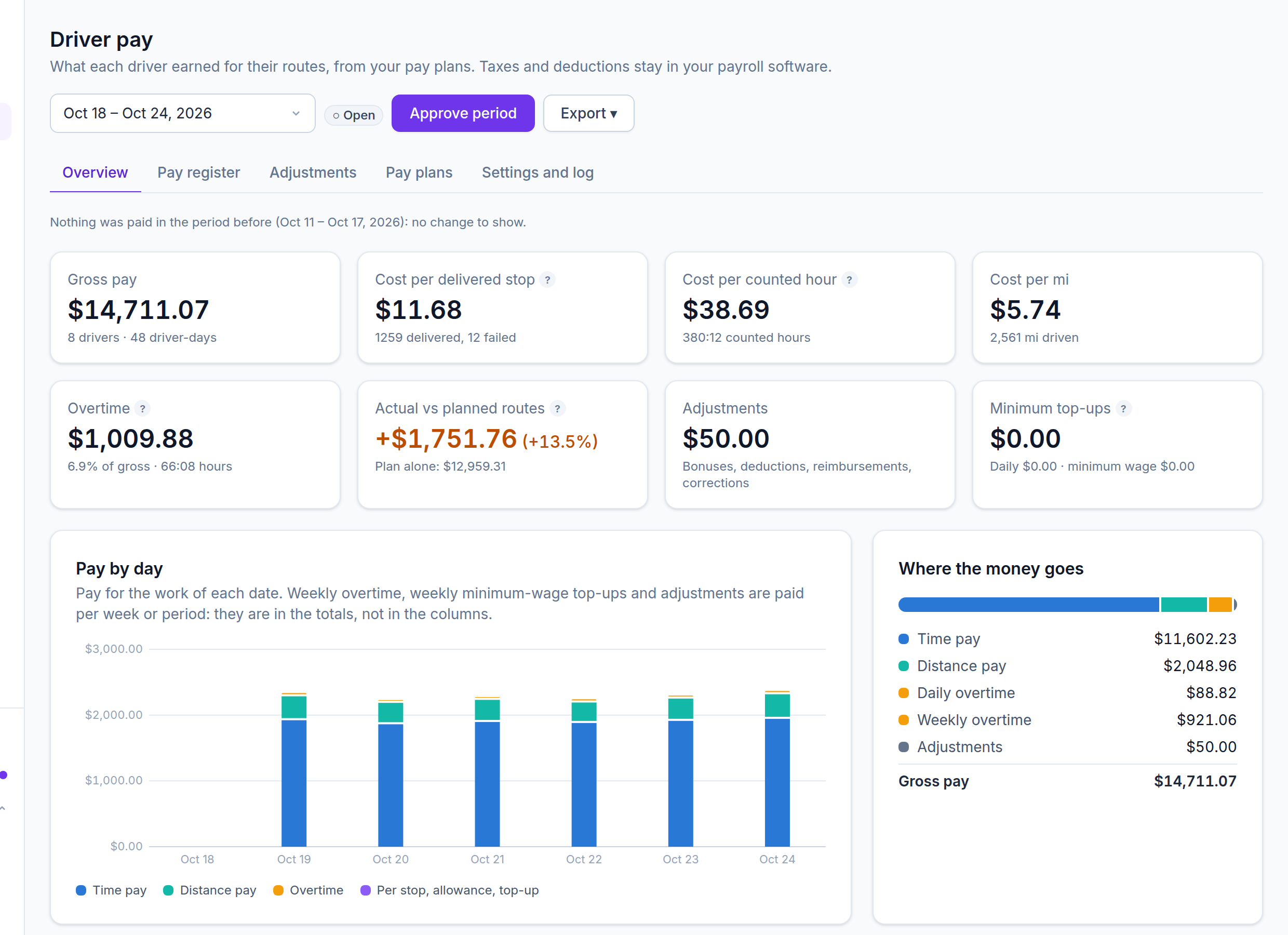
Pay that follows the work
Hours and miles come from each route: from the plan, or from the driver’s reports and GPS when you pay actual time. No more adding up timecards by hand.
Built around US overtime rules
Daily and weekly overtime tiers, 40 hours on your own workweek, overtime on the regular rate, a weekly minimum-wage check and California’s seventh-day rule as an option.
Only finance sees pay
A Finance role sees driver pay and nothing else: no routes, orders or customers. Dispatchers and customer service never see pay rates or pay.
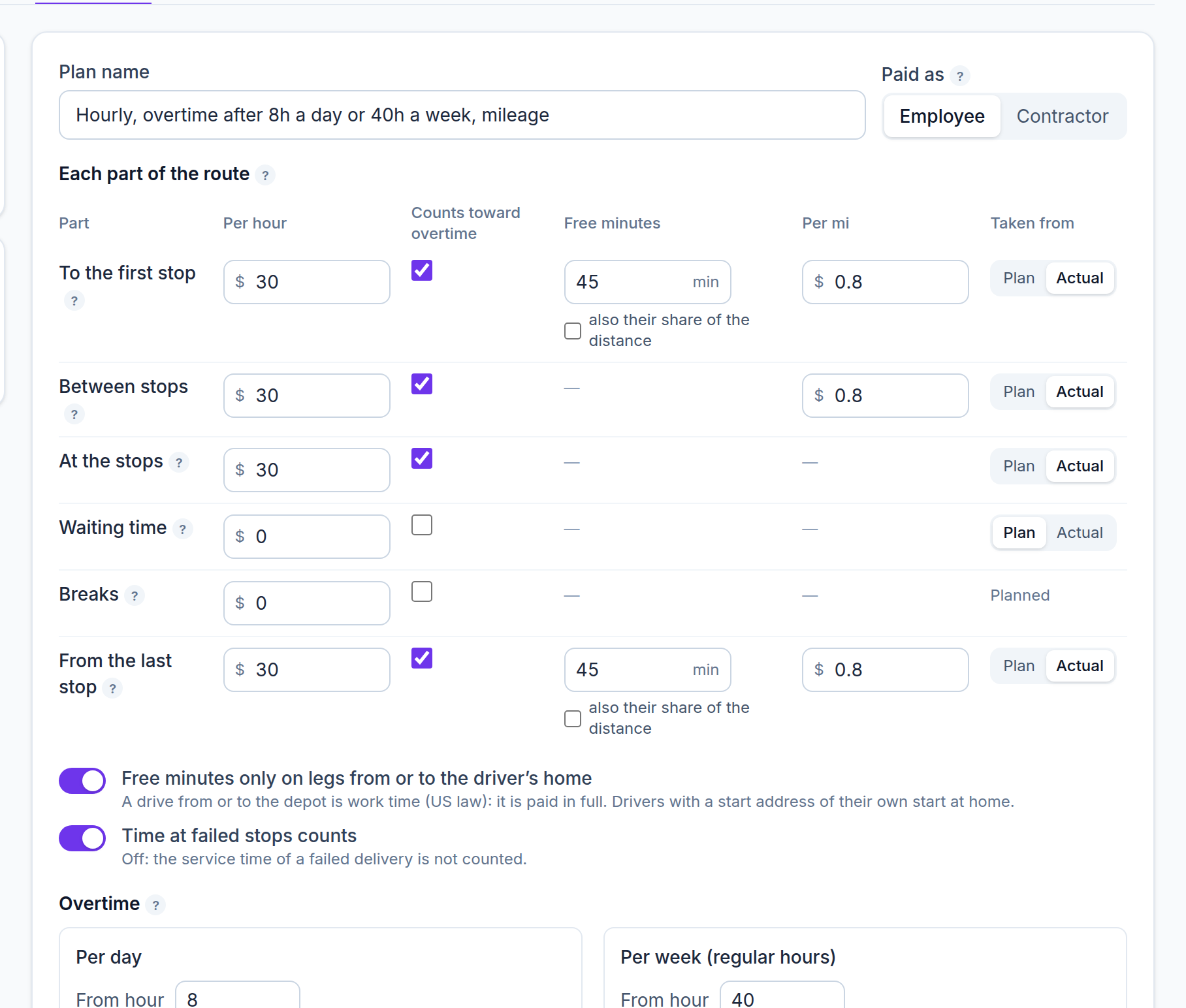
A pay plan for every part of the route
Each part of a route has its own rate per hour and per mile, and you choose whether it is paid from the plan or from what really happened. Free commute minutes apply only to a drive from or to the driver’s own home; a drive from or to the depot is work time and paid in full.
- To the first stop, between stops, at the stops, waiting, breaks and from the last stop, each priced on its own
- Choose which parts count toward overtime
- Pay per delivered or failed stop, a daily allowance and a daily minimum
- Rounding of paid minutes if you want it, none by default
- Several plans per company, one per driver, and a driver’s own rates where they differ
Start from a ready pay plan
Pick the template closest to how you pay, then change what differs. Every template is a starting point, not legal or tax advice, so check the amounts with your payroll advisor.
- Hourly, overtime after 40 hours a week (most states)
- Hourly, overtime after 8 hours a day or 40 a week, plus mileage
- California: daily and weekly overtime and the seventh-day rule
- Two-person crews for furniture and appliances, paid by the hour
- Employees paid per stop and per mile, topped up to the minimum wage
- 1099 contractors paid per stop and per mile, or a flat day rate plus a little per stop
- Teams in Sweden, Vietnam and Spain get templates of their own, in their own currency
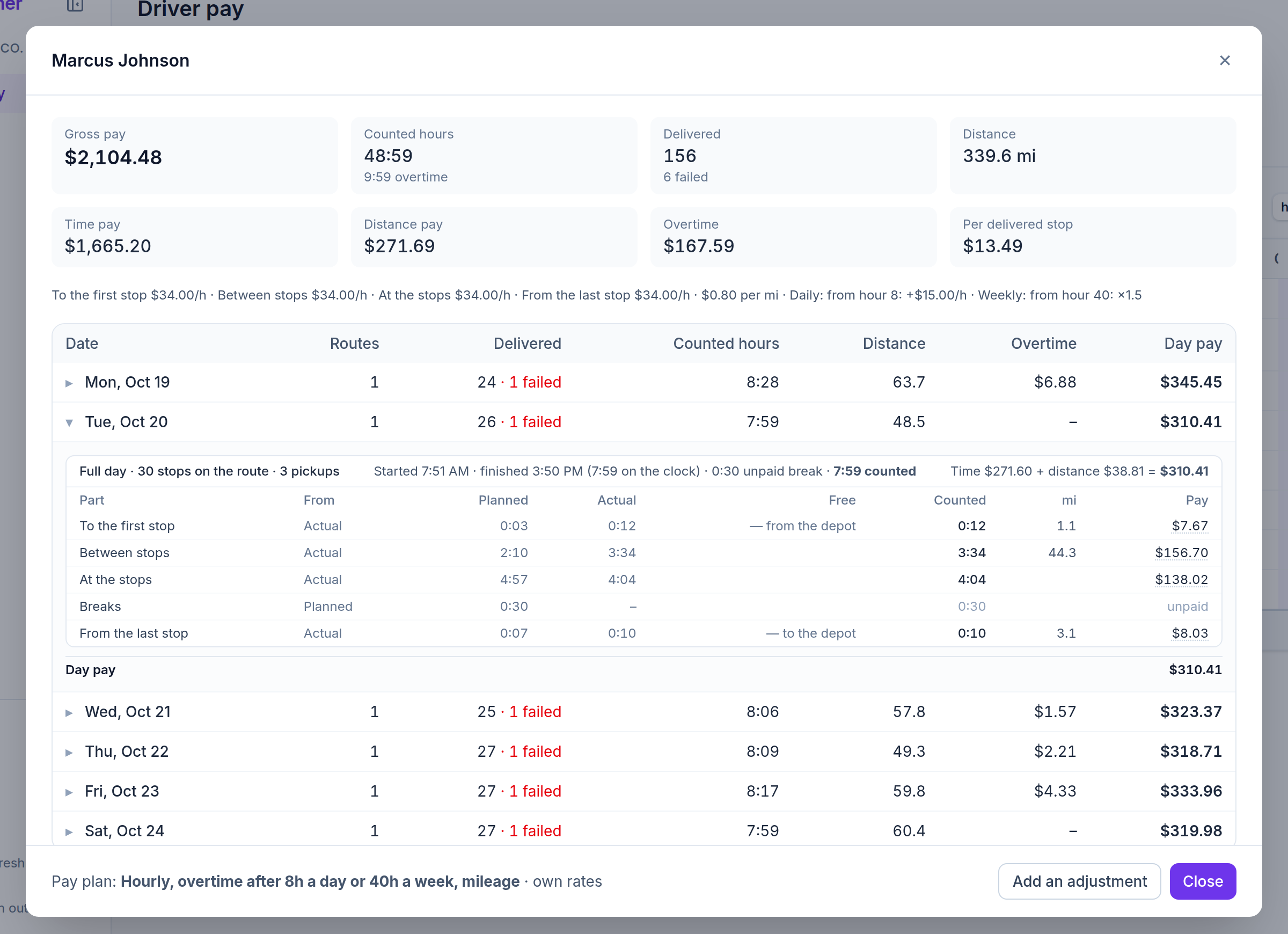
Every dollar explained
Open a driver to see each day split into the parts of the route: planned and actual minutes, free and counted minutes, miles and pay, then the overtime and the day’s total. Where nothing was measured, the plan is used and the report says so.
A fictional delivery company in the middle of its day: watch the vans move in Live, replay the day so far and open any order. Read-only, no sign-up.
Overtime, built around US rules
Set overtime tiers per day and per week, each “from hour N: + $X an hour” or “× 1.5” of the regular rate. Each hour earns one premium, never daily and weekly overtime both. You choose the rules in each plan, so check them with your payroll advisor where your state adds its own.
- Weekly overtime after 40 hours, counted on your company’s workweek whatever your pay period
- The regular rate behind “× 1.5” includes per-stop pay and allowances; mileage paid back as a reimbursement stays out
- A weekly minimum-wage check that tops up per-stop pay when it falls short
- California’s seventh consecutive day, as an option
- Taxes, withholding and deductions stay in your payroll software
Pay periods you approve
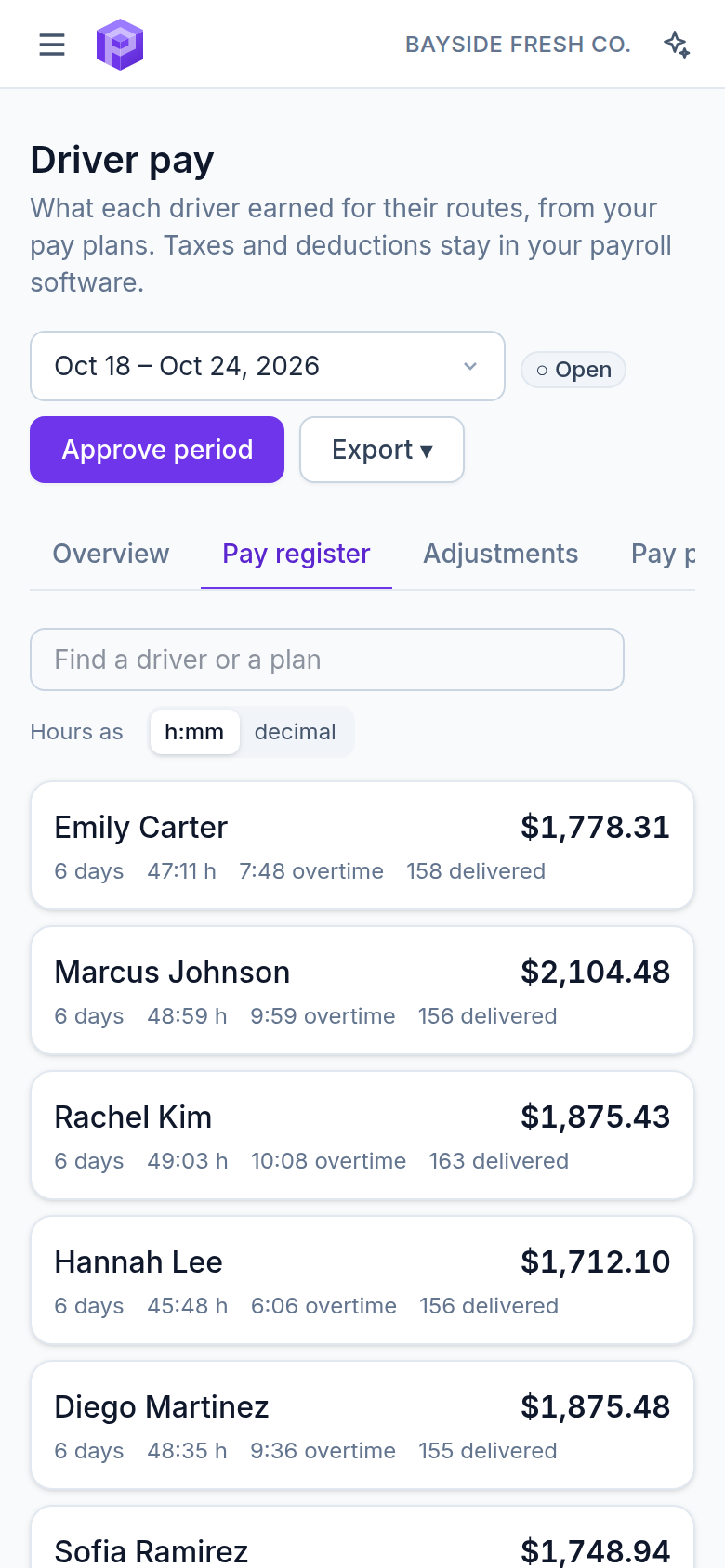
Weekly, every two weeks, twice a month or monthly. The pay register lists each driver’s pay, hours, overtime and delivered stops. An approved period is frozen: a new rate or a late report shows as a difference and never changes approved pay. Mark it paid, or reopen it with a reason.
- Adjustments for bonuses, deductions, reimbursements and corrections
- A finished route whose GPS measured less than half of its planned miles (a phone that died, a track cut short) is paid on the planned miles and listed under Check before approving: accept it by approving, or click Correct to open an adjustment for that driver and day
- Every change in a log: who changed what, and when
- The register works on a phone too
Controls an auditor trusts
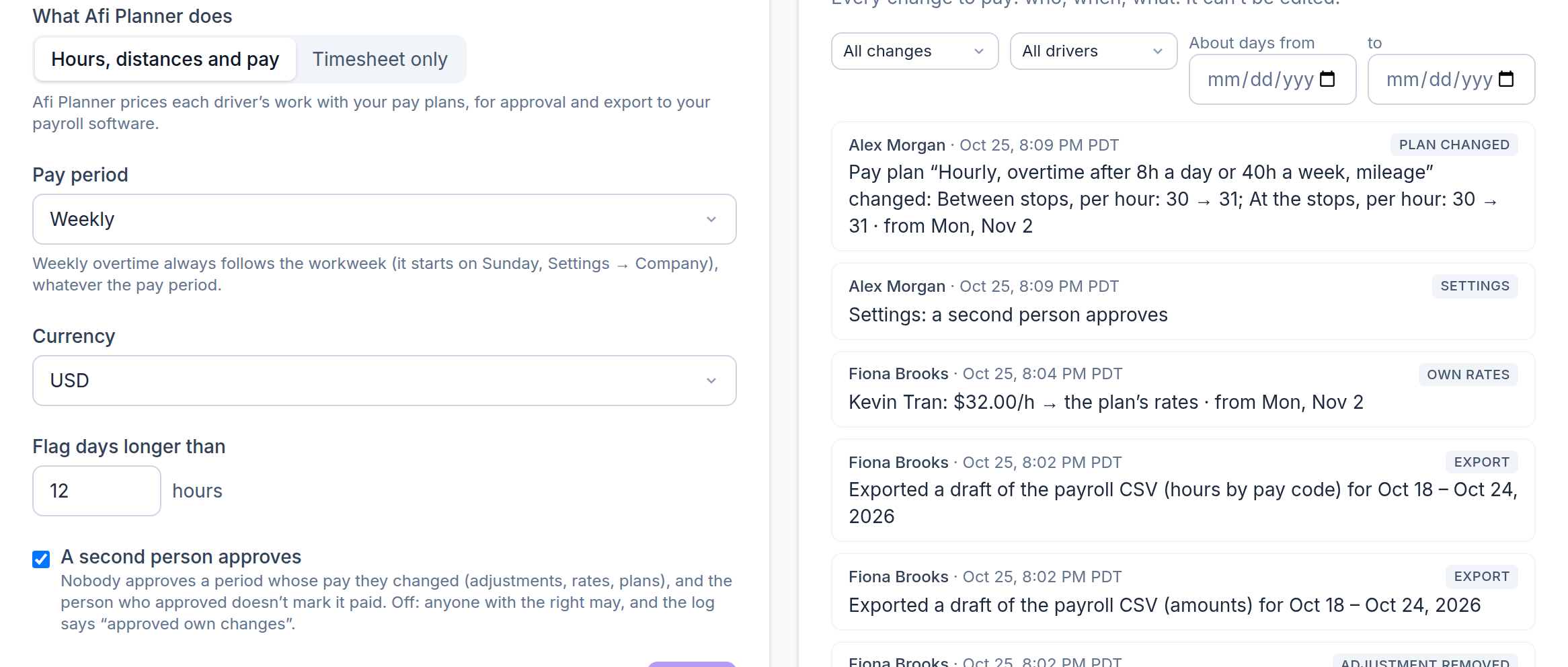
Pay goes out only after the right person checks it. Approving is a right of its own, so the person who prepares the pay doesn’t have to be the one who approves it, and every change says who made it, when and why.
- “Approve driver pay” is separate from “Driver pay”: give it to the person who signs off
- An optional second approver: nobody approves a period whose pay they changed, and the approver doesn’t mark it paid
- A rate change applies from the date you choose; the days before keep the rate they were worked at
- Removing an adjustment needs a reason, like adding one
- A log you can filter by change, driver and dates, and download as a CSV
- A paid period reopened remembers what was paid, so the next run pays only the difference
What your drivers really cost
The overview puts gross pay next to cost per delivered stop, per counted hour and per mile, the overtime share and what paying actual time cost against the plan, with pay by day and by driver.
Exports your payroll software can read
Afi Planner works out gross pay from the work. Your payroll software still runs payroll, so everything goes out in files it can take in.
- An Excel workbook where every figure is a live formula from the minutes and miles, so your accountant can check any cell
- Two payroll CSVs keyed by each driver’s payroll ID: every amount already priced, or hours by pay code (regular, overtime, double time) for your payroll software to price; import one of them
- Mileage over the IRS rate split out as taxable wage
- Files of a period not yet approved are named as drafts
- Timesheets in Excel or CSV: each part of each route, planned, actual and counted
Timesheet only, if you pay in your own system
Already work out pay somewhere else? Switch Driver pay to Timesheet only and Afi Planner just measures the work: every part of each route, planned and actual, ready to export, with no rates and no money.
Frequently asked questions
Does Afi Planner run payroll?
No. It works out each driver’s gross pay from their routes and exports it. Taxes, withholding and deductions stay in your payroll software.
Who can see driver pay?
The Finance role, the owner and admins. Dispatchers, customer service and API keys never see pay rates or pay. A company can also add driver pay to a role of its own.
Who can approve pay?
Anyone whose role has “Approve driver pay”: the Finance role, the owner and admins by default. Turn on “A second person approves” and nobody can approve a period whose pay they changed, or mark paid a period they approved.
Does it follow US overtime law?
It is built around the federal rules: overtime after 40 hours in a workweek on the regular rate, no hour paid overtime twice, and a weekly minimum-wage check, with California’s seventh-day rule as an option. You set the rules in each plan, and state and local rules differ, so check them with your payroll advisor.
Can we pay planned time instead of actual time?
Yes, part by part. Each part of the route is paid from the plan or from the driver’s reports and GPS; breaks always follow the plan.
More features
- Route optimizationOptimized routes that respect how your day really worksLearn more
- Dispatch & live trackingKnow what needs you before your phone ringsLearn more
- Driver appA driver app built for the curb, not the officeLearn more
- Customer trackingFewer “where’s my order?” callsLearn more
- AnalyticsSee how every route really wentLearn more
- Integrations & APIConnect your systems in both directionsLearn more
- Import & addressesFrom spreadsheet to map in secondsLearn more
Plan tomorrow’s routes in the next 3 minutes
Start your free 3-month trial. No credit card, no setup call, no installation.